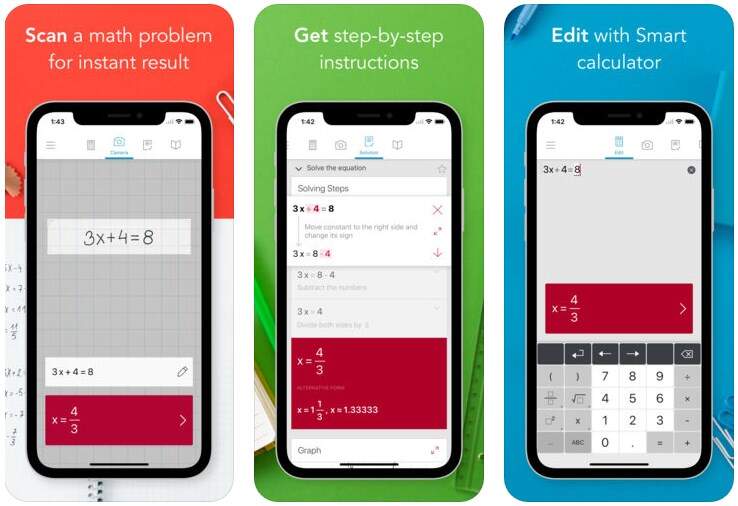
Mathematics can be challenging, but with the help of technology, it’s easier than ever to find solutions to complex problems. Photomath is an app that allows you to scan and solve math problems instantly using your smartphone. It offers solutions and step-by-step explanations for a variety of math topics, including arithmetic, algebra, calculus, and more. The app is designed to assist students, educators, and anyone in need of math help by providing accurate answers and visual guides to help understand the steps behind solving a problem.
What makes Photomath unique?
What sets Photomath apart from other math-solving apps is its combination of powerful features that make learning and problem-solving easier:
Step-by-Step Solutions: Unlike other apps that just give you the answer, Photomath provides a detailed breakdown of each step involved in solving the problem. This helps users learn the process and better understand the math behind the solution.
Camera Recognition Technology: You can simply take a picture of a math problem, and Photomath will recognize and solve it. The app uses advanced image recognition technology to instantly scan problems and provide answers—saving time and eliminating the need to type out each equation.
Wide Range of Math Topics: Photomath supports a broad spectrum of math problems, from basic arithmetic to complex topics like trigonometry, calculus, and statistics. This makes it suitable for users of all levels.
Interactive Graphing (Photomath Plus): For premium users, Photomath includes interactive graphing features that allow users to visualize complex equations and functions in a graph format. This helps users understand the behavior of the equations they are solving.
Picked your interest? Here is a quick guide!
Setting Up Your Account
When you first open Photomath, you’ll be prompted to sign up for an account.
Here’s how to set it up:
Tap “Sign Up” or “Log In.”
Enter your email address, Google account, or Facebook account to create an account.
After completing registration, you’ll be directed to the main screen where you can start solving math problems.
Navigating the Home Screen
After logging in, you’ll land on the home screen, where you can access the core functions of Photomath:
Camera Mode: The primary feature of the app, allowing you to scan and solve math problems.
Manual Input: If you prefer typing, you can manually enter math problems.
Profile: Your personal profile with saved problems, history, and preferences.
How to use it
Camera Mode (Scan Problems):
Open the app and point your phone’s camera at a math problem (e.g., written on paper or in a textbook).
Tap the capture button, and the app will automatically recognize the problem and show you the solution.
Step-by-Step Explanations:
For every problem you solve, Photomath provides a detailed explanation of the steps involved.
Tap “Steps” to view a breakdown of each stage of solving the problem.
Manual Input Mode:
If you prefer typing in the problem, tap the “Manual” option on the home screen.
Use the virtual keypad to type the math problem (e.g., 2x + 3 = 7).
Tap “Solve” to get the solution and breakdown.
Voice Recognition (Premium Feature):
For hands-free use, tap the microphone icon to speak a math problem. Photomath will interpret your voice and solve the equation.
Customizing Settings
You can also personalize Photomath to fit your needs. Here’s how:
Change Language: Go to settings and select your preferred language for solving problems.
Adjust Settings for Step Explanations: If you prefer a more detailed breakdown or fewer steps, adjust the explanation settings in the app’s options.